Accidentally Quadratic with DataFrames in Julia
Quadratic algorithms are fast enough when testing, but once in production, all of a sudden, the performance issues catch up with you, and you’re sitting with a very inefficient process. Well, that happened to me.
A post recently did the rounds, where it looks like GTA had a bad implementation of an algorithm that scaled in a quadratic fashion (How I cut GTA Online loading times by 70%), which echoed a Bruce Dawson quote and article about how it is common for quadratically efficient processes to end up in production.
Enjoy these types of posts? Then sign up for my newsletter.
Every month, I recalibrate a model using the latest data pulled from a database. I take this raw data and generate some features, fit a model and save the results. One of those operations is to match all the IDs with the old data and new data to work out which trades need new features to be generated.
Basically, imagine I have a dataframe, and I want to find all the rows
that match some values. In this mock example, column B contains the
IDs and I’ve some new IDs that I want to filter the dataframe for.
using DataFrames, DataFramesMeta
using BenchmarkTools
using Plots
I’ll create a large mock dataframe as an example.
N = 1000000
df = DataFrame(A = rand(N), B = 1:N);
My slow implementation uses the DataFramesMeta package and uses the broadcasted in function to check whether each value was in the new ids. This worked without a hitch last month, but then all of a sudden seemed to be incredibly slow. This was strange as I hadn’t changed anything, did the usual reboot of the machine and start afresh, but it was still painfully slow.
function slow(df, ids)
  @where(df, in(ids).(:B))
end
After a quick profiling, I found that it was the above function that
was the bottleneck. So I refactored it to remove the DataFramesMeta dependency and just used the base functions.
function quick(df, ids)
  df[findall(in(ids), df.B), :]
end
Thankfully, this solved the issue, was much quicker and allowed my process to complete without a hitch. This got me thinking, how slow was my original implementation, and how much different is the new version? So onto the benchmarking.
Using the BenchmarkTools.jl package, I can run multiple iterations of each function across larger and larger ID samples.
nSamps = [1, 10, 100, 1000, 10000, 100000, 1000000]
resQuick = zeros(length(nSamps))
resSlow = zeros(length(nSamps))

for (i, n) in enumerate(nSamps)
  ids = collect(1:n)

  qb = @benchmark quick($df, $ids)
  sb = @benchmark slow($df, $ids)

  resQuick[i] = median(qb).time
  resSlow[i] = median(sb).time
end
I’ve made sure that I compiled the original function before starting this benchmarking.
plot(log.(nSamps), log.(resQuick), label="Quick", legend=:topleft, xlabel="log(Number of IDs selected)", ylab="log(Time)")
plot!(log.(nSamps), log.(resSlow), label="Slow")
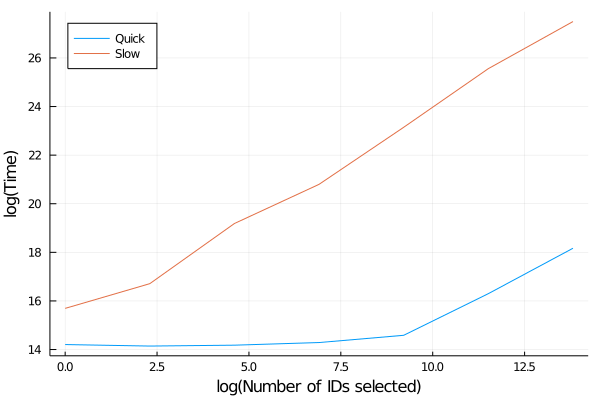
The difference in performance is remarkable. The quick function
is pretty much flat and just a slight increase towards the large sizes
in this log-log plot, whereas the slow version is always increasing. When we model the slow implementation performance as a power law, we find that it is not quite quadratic, but more importantly, we can see that the faster method is pretty much constant, so it is a much scalable solution.
using GLM
lm(@formula(LogTime ~ LogSamps),
     DataFrame(LogSamps = log.(nSamps), LogTime=log.(resSlow)))
StatsModels.TableRegressionModel{LinearModel{GLM.LmResp{Vector{Float64}}, GLM.DensePredChol{Float64, LinearAlgebra.CholeskyPivoted{Float64, Matrix{Float64}}}}, Matrix{Float64}}

LogTime ~ 1 + LogSamps

Coefficients:
─────────────────────────────────────────────────────────────────────────
                 Coef.  Std. Error      t  Pr(>|t|)  Lower 95%  Upper 95%
─────────────────────────────────────────────────────────────────────────
(Intercept)  15.1134     0.275726   54.81    <1e-07  14.4046    15.8221
LogSamps      0.885168   0.0332117  26.65    <1e-05   0.799794   0.970541
─────────────────────────────────────────────────────────────────────────
When I first came across this issue, I was ready to book out my week to rewrite the data functions to iron out any of the slowdowns, so I was pretty happy that rewriting that one function made everything manageable.